
The Analytics page provides in-depth business performance insights across bookings, revenue, staff, services, and customers. Navigate to Radius Booking → Analytics.
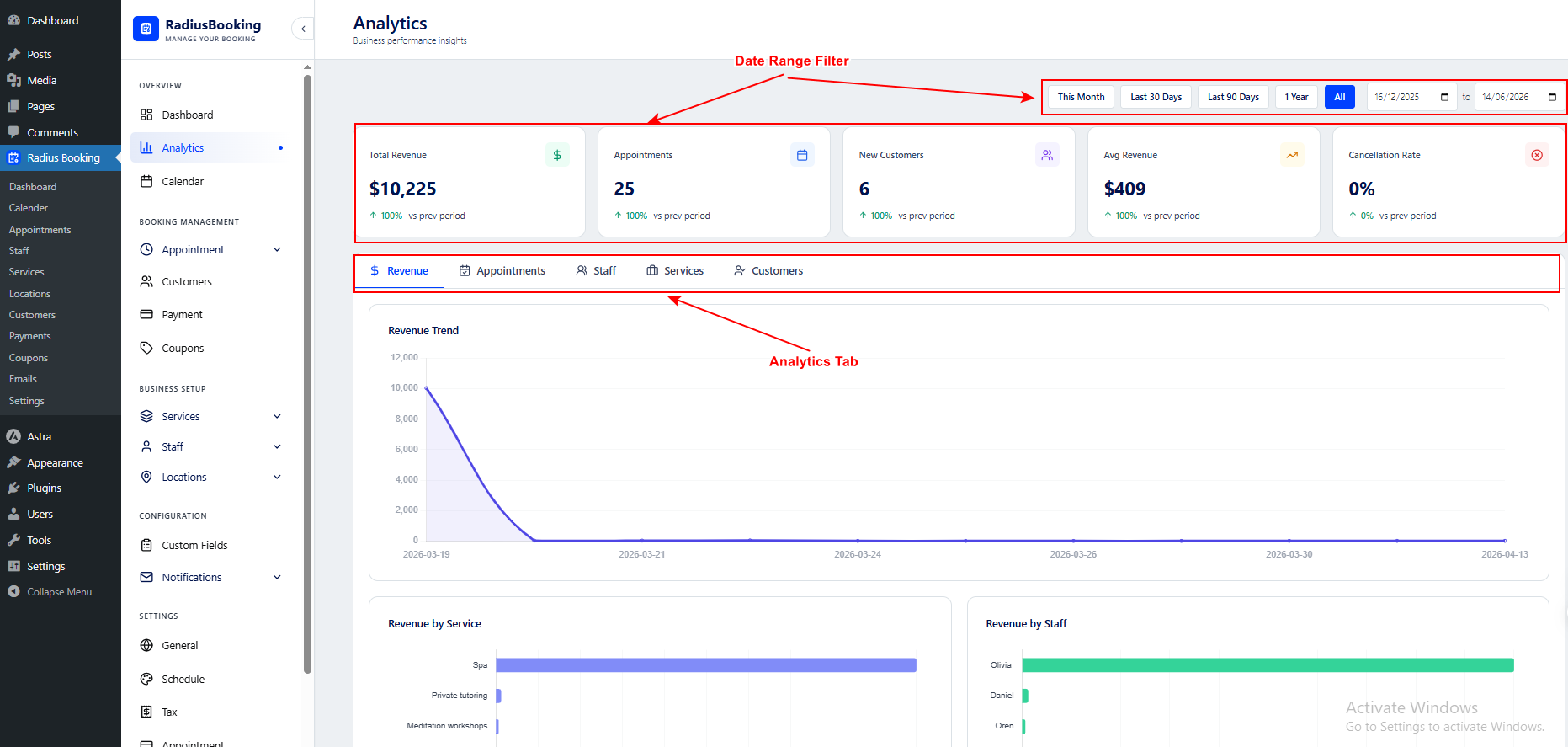
Date Range Filter
All analytics data is filtered by the selected time period. Use the preset buttons or set a custom range: This Month, Last 30 Days, Last 90 Days, 1 Year, and All.
Analytics Tabs
The main analytics section is divided into five tabs, each providing a focused breakdown of a different area of your business:
- Revenue: Shows the Revenue Trend line chart. A day-by-day view of income over the selected period. Hover over any point to see the exact revenue for that date. Also displays Revenue by Service and Revenue by Staff bar charts, showing which services and staff members generate the most income.
- Appointments: Breaks down booking volume over time with charts showing appointment trends, top-performing services by booking count, and appointment distribution by staff.
- Staff: Analyzes individual staff performance including number of appointments handled, revenue generated, and other performance indicators per team member.
- Services: Shows which services are most popular, their booking frequency, and revenue contribution. This is useful for identifying top-performing and underperforming offerings.
- Customers: Provides customer behavior insights including new vs. returning customers, booking frequency, and top customers by spend.
Info: Use the Revenue by Service and Revenue by Staff bar charts to identify your most profitable services and highest-earning team members at a glance.


